Coding agents can build a working application in minutes. But most organizations are spending more time preparing data for the agent than the agent spends building the solution. The bottleneck was never the model. It is the data strategy, and most teams don't have one.
The Ad Hoc Data Problem
Most people using coding agents today have no data strategy. Their data lives across Google Drive, local folders, cloud storage, email attachments, all scattered across dozens of sources that feed into their daily workflows. When they want to automate something with a coding agent, the first task is always the same: open the file explorer, hunt through directories, find the right reports, locate the Excel spreadsheets, track down the PDFs. Ten file windows open at once, dragging and dropping data into place for a single session.
The fundamental issue is not that coding agents lack capability. The issue is that people are still organizing their data for personal consumption, filing things where they can find them, rather than designing a data framework that their agents can navigate programmatically. There is a critical difference between "I know where my files are" and "my agent always knows where to look."
Without a deliberate data framework, every automation attempt becomes a one-off exercise. The session itself might produce something useful, but it does not scale. What happens when that session contains important data you need across multiple projects? Now the agent has to figure out how to access all of that context, and you are banking entirely on the agent's ability to navigate through an unstructured collection of files reliably, potentially across hundreds of sessions.
The shift that most teams have not made yet:
- Moving from organizing data for personal use to designing a data framework that agents can consume automatically
- Designing skills so that agents always know where to look for specific types of information
- Setting up data once so it flows into every session without manual retrieval
- Thinking about data architecture as infrastructure, not as file management
The technology is arguably new enough that most people simply have not considered this yet. They are experimenting with workflows, not engineering them. That is understandable, but it means the ad hoc approach is the default, and the ad hoc approach does not compound.
The Core Insight: Data Is the Multiplier
Here is the headline finding for any leader evaluating coding agent ROI:
The value an organization extracts from AI agents is directly proportional to how well it manages the data those agents operate on. Not the model quality. Not the prompt sophistication. The accessibility, organization, and persistence of the data.
This principle has been validated across individual developers, small teams, and enterprise deployments. DevPro has saved 40–60% in development time by designing deliberate data flows for agent consumption compared to ad hoc approaches. The reason is compounding; once data is properly organized, every subsequent agent session builds on the last rather than starting from zero.
Two Architectural Principles for Agent-Ready Data
Two foundational ideas consistently differentiate high-performing agent workflows from ad hoc ones. Neither is revolutionary on its own. Together, they fundamentally change the value equation.
Principle 1: Centralize and Reuse Data Across Projects
The first pattern is structural: organize projects so that agents can access shared data without duplication. When client information, reference documents, templates, and configuration files live in a centralized, linked location, an agent working on any project can access the same source of truth.
This eliminates three categories of waste:
- Redundancy: No more copying the same CSV or brief into every project directory
- Drift: No more "which version of this document is current?" across project folders
- Setup time: No more manually locating and providing data at the start of each session
In practice, this means designing a working directory structure where shared data is linked rather than copied, and where the project structure itself communicates to the agent where data lives. The goal is that when an agent starts a session, the data it needs is already accessible, not somewhere else requiring manual retrieval.
Principle 2: Dynamically Allocate Skills at Every Scope Level
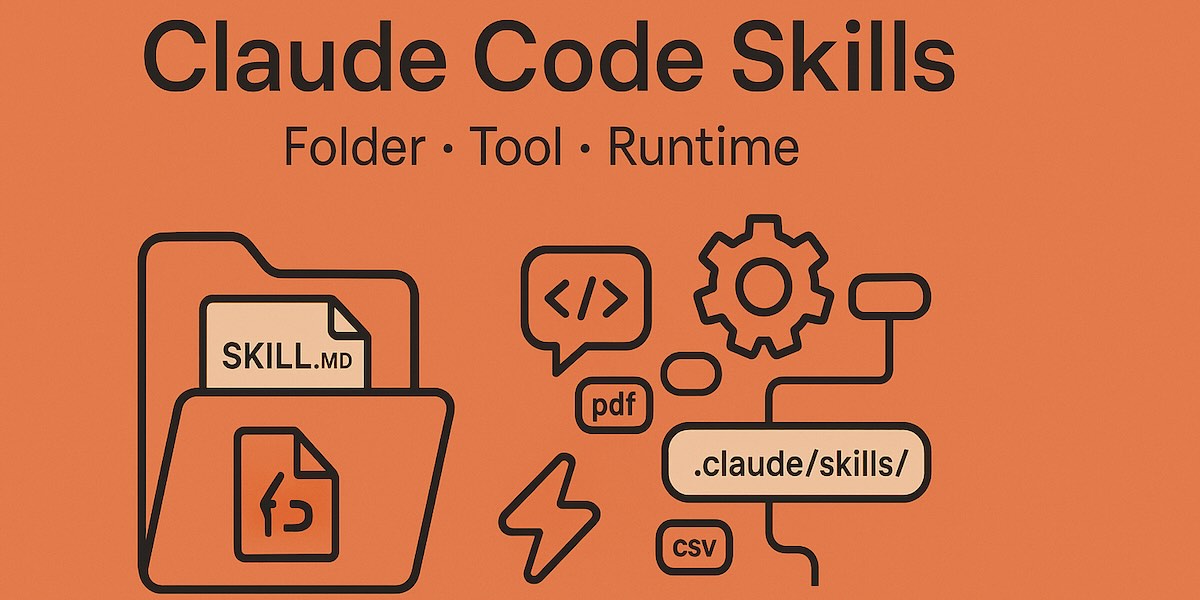
The second pattern leverages the agent's native configuration capabilities, specifically the skills system in tools like Claude Code.
A skill is a set of reusable instructions that the agent can invoke automatically or on command. Skills live in a .claude/skills/ directory and contain a SKILL.md file with structured instructions: what to do, when to trigger, and what tools to use. Think of skills as persistent expertise that survives across sessions.
Skills operate at multiple scope levels:
- Personal skills (
~/.claude/skills/) apply across every project. These encode universal preferences and workflows. - Project skills (
.claude/skills/within a project directory) apply to that specific project. These encode project-specific automation. - Enterprise skills deployed via managed policy apply organization-wide and cannot be overridden by individual users.
The most powerful application of this hierarchy is self-optimizing agents. When a project includes a skill that instructs the agent to "dynamically add skills as you identify recurring patterns," the agent begins building its own institutional knowledge. It identifies repeated operations and creates skills to automate them. The agent gets better at the project the more it works on it, and that expertise persists across sessions.
This is the compounding advantage most organizations miss entirely.
The Configuration Layer Most Teams Skip
Skills are one half of the persistent knowledge story. The other half is CLAUDE.md, instruction files that the agent loads at the start of every session. If skills are the agent's playbook, CLAUDE.md is its briefing document.
CLAUDE.md files follow a scope hierarchy with higher levels taking precedence:
- Managed policy: organization-wide instructions deployed by IT that cannot be overridden. Enterprises use these to enforce security posture, coding standards, and compliance requirements across every agent session in the company.
- Project-level (
./CLAUDE.mdor./.claude/CLAUDE.md): checked into version control and shared with the team. Build commands, testing conventions, architectural decisions. - User-level (
~/.claude/CLAUDE.md): personal defaults across all projects. Code style, git workflow, toolchain preferences. - Subdirectory-level: loaded on demand when the agent reads files in specific subdirectories. This supports monorepo patterns where different codebases have different conventions.
The best practice is counterintuitive: keep CLAUDE.md files under 200 lines. Longer instruction files reduce adherence because they compete for space in the agent's context window. Write specific, verifiable rules, not vague guidance. Include only what the agent cannot infer from reading the code itself.
Complementing this is the .claude/rules/ directory, where teams can organize instructions by topic with path-specific activation. A rule scoped to src/api/**/*.ts will only load when the agent is working in the API layer, keeping context lean and relevant.
The finding across organizations is consistent: most teams have zero configuration at any of these levels. They are running powerful agents with no briefing document, no skills, and no persistent instructions. Every session starts from zero. This is the single largest source of wasted time in agent workflows today.
Permission Modes and Autonomous Execution
Data strategy is necessary but not sufficient. The operational workflow, specifically how agents execute and how much autonomy they have, determines whether the data advantage compounds or stalls.
Claude Code supports multiple permission modes that control agent autonomy:
- Default mode: Manual approval required for file edits and bash commands. Best for sensitive work and initial trust-building.
- AcceptEdits mode: Auto-approves file changes while still gating bash commands. Ideal for active development iterations.
- Auto mode: Uses a safety classifier to evaluate each action against the project context before executing. Blocks scope escalation and hostile-content-driven actions while allowing routine operations. Best for reducing approval fatigue on long tasks.
- Managed policies: Enterprise-deployed permission configurations that cannot be overridden. IT teams set approved tool lists, restrict models, and enforce audit logging organization-wide.
The practical impact: with proper permission configuration, a developer can have multiple projects open simultaneously, each with agent terminals working in parallel. The agents handle code generation, testing, and iteration autonomously. The developer monitors progress and provides high-level direction, the strategic work that humans do best.
This is where standardized run processes matter. When every application in an organization includes a consistent execution pattern, such as a bash script that handles dependency installation, server startup, and multi-stack coordination regardless of the technology, running any project becomes a single action. No manual terminal setup. No remembering framework-specific commands. The agent self-configures the run process based on the application's stack.
Enterprise Guardrails: Hooks, Audit Logging, and Programmatic Control
For organizations scaling agent adoption beyond individual developers, the governance layer becomes critical. Claude Code provides programmatic guardrails through a hooks system, shell commands that execute at specific lifecycle points:
- PreToolUse hooks can block destructive operations before they execute, preventing writes to protected files, dangerous git operations, or access to restricted resources.
- PostToolUse hooks can enforce formatting, linting, and code standards after every file modification.
- ConfigChange hooks enable audit logging, tracking every configuration modification across the organization.
- SessionStart hooks can inject environment-specific context, ensuring agents always have the right credentials, paths, and configurations for their deployment environment.
These hooks can be deployed via managed settings, meaning they apply organization-wide and cannot be disabled by individual users. Combined with managed CLAUDE.md files and enterprise skill libraries checked into shared repositories, this creates a governed agent infrastructure that scales from one developer to thousands.
Case Study: Open Canvas
DevPro's Open Canvas project illustrates these principles in practice. Open Canvas is a browser-based workspace that centralizes project data, dynamically allocates skills at every scope level, and standardizes application execution across any technology stack.
The results: approximately 50% reduction in daily development time for multi-project workflows. The reduction is not attributed to any single feature but to the cumulative elimination of data friction. Centralized shared data eliminates file hunting, the skill hierarchy eliminates repeated instructions, standardized run scripts eliminate setup ceremony, and permission configuration eliminates approval fatigue.
Each of those friction points was small individually. Together, they were consuming half the productive time. That is the data strategy tax most developers are paying without recognizing it.
Recommendations for Leaders
The specific tooling, whether it is a browser workspace, VS Code, or another environment, is secondary. What matters is the pattern:
1. Audit Your Data Flow
Spend a focused day mapping how data currently gets into agent sessions across your organization. Where does the data live? How do developers get it to the agent? How much time is spent on manual data preparation versus productive work? If people are copying and pasting context into agent sessions, that is a process failure, not a workflow.
2. Centralize and Structure Your Data
Get data into locations and formats that agents can access natively. For individual workstations, this means organizing working directories so related data lives together. For teams, it means shared data repositories that every agent session can reference. The goal: when an agent starts a session, the data it needs is already there.
3. Configure Persistent Agent Knowledge
Set up CLAUDE.md files at every scope level. Create skills for workflows repeated more than twice. Use the .claude/rules/ directory for path-specific conventions. Most importantly, instruct agents to create their own skills as they work, and let them build institutional knowledge that compounds over time.
Use all three configuration levels: personal settings in ~/.claude/ for universal preferences, project-level settings in .claude/ for team conventions checked into git, and managed policies for organizational standards.
4. Design Your Permission Strategy
Match permission modes to trust levels and environments. Use acceptEdits for active development, auto mode for autonomous work, and managed policies for team-wide governance. Deploy hooks for audit logging, formatting enforcement, and destructive operation prevention.
5. Think Beyond the Individual Workstation
On a personal machine, the data modernization effort is minimal. Agents read local files directly without requiring vector embeddings or RAG pipelines. But at organizational scale, the question becomes: how do we make our collective data agent-friendly?
This is where managed CLAUDE.md files deployed via IT ensure every session follows the same standards. Managed settings lock down permissions and approved tools. Enterprise skill libraries encode organizational best practices. The infrastructure exists today, and the question is whether organizations are using it.
The Compounding Advantage
Having no plan for data management in an agent workflow means every session potentially reinvents the wheel. The organization wastes time, misses the compounding value of agents building expertise on persistent data, and leaves the majority of the ROI on the table.
The agents are capable. The tooling is mature. The configuration systems (skills, CLAUDE.md, hooks, managed policies) are production- ready and deployed at enterprise scale. The remaining variable is whether the organization's data is ready for them.
The organizations that invest in data strategy now will see their agent productivity compound daily. Those that continue with ad hoc approaches will continue reinventing the wheel, and the gap between the two will widen with every session.
Sources
Rodney Brown is the founder of DevPro LLC, an AI governance and infrastructure consulting practice. DevPro helps organizations design data strategies, agent workflows, and governance frameworks for scalable AI adoption. Learn more at devprollc.com.